

Message Template Sets
Control the communication when sending an inspection
What is a Message Template?
A message template set is the collection of templates that dictate exactly how Vision will communicate the inspection to the customer. A message template set is a require part of an inspection type. When you create an inspection with a given inspection type, Vision uses the templates attached to that inspection type to communicate with the customer.
Each of the templates are used for both email and text communication, and can be customized to include various data from your inspection request using special variables.
Changes to a message template set affect every inspection type connected to that set.
We strongly recommend using the dashboard admin UI to build and edit your message templates. It makes it easier to manage text, email, and subject variants, insert supported template variables, and review changes before they affect every inspection type connected to the set.
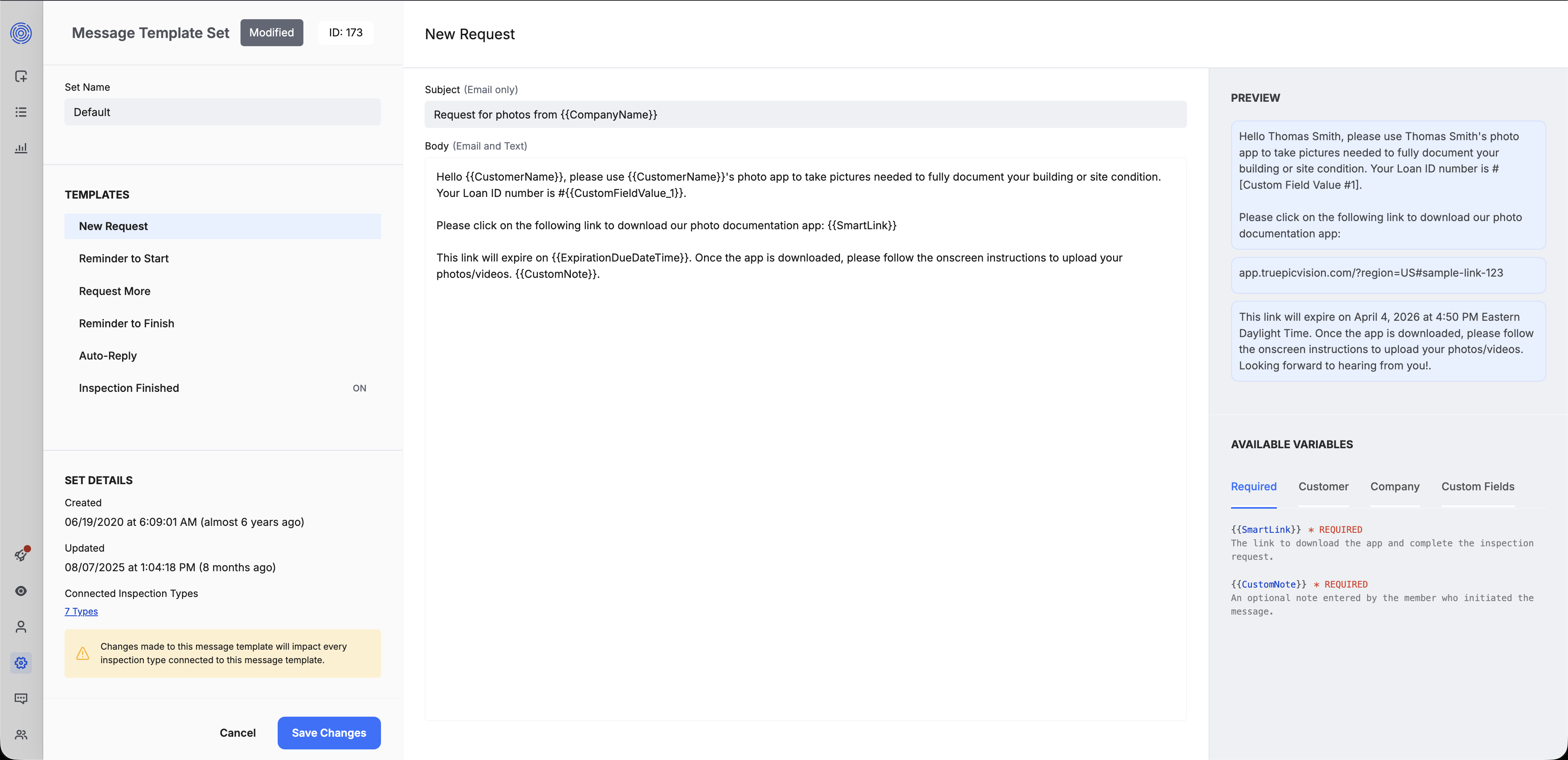
Template types in detail
New Request
Use the New Request template for the customer's first invitation to complete an inspection. Vision also uses this template when you resend the original inspection request.
Reminder to Start
Use the Reminder to Start template to follow up with customers who have not started the inspection yet.
If you use automatic start reminders, the schedule is configured on the team, not in the message template set. See the Message Template Sets reference overview for the related fields.
Reminder to Finish
Use the Reminder to Finish template to follow up with customers who started an inspection but have not completed it yet.
If you use automated finish reminders, this template controls the message content, but the schedule is configured on the team. See the Message Template Sets reference overview for the related fields.
Request More
Use the Request More template when the customer has already started or submitted an inspection, but you need additional photos, videos, or answers.
See Request More for request for more details.
Auto-Reply
The Auto-Reply template is used for automated replies generated when an customer replies to the text message or email that they received requesting the inspection.
The webhook action reference also includes an Auto-Reply template for both text and email:
ACTION_MESSAGE_AUTO_REPLY_TEXTACTION_MESSAGE_AUTO_REPLY_EMAIL
If you use webhook events to monitor customer communications, these actions indicate that Vision sent an auto-reply message.
Inspection Finished
The Inspection Finished template is used to notify the customer after an inspection is finished.
See the Message Template Sets reference overview for the fields that control this message.
Template variables
Each template type can have text and email variants. Email-capable templates also include subject fields. When you edit a template in the admin UI, you can insert supported template variables wrapped in double brackets, such as {{MemberName}}.
Vision replaces these variables with real inspection values when it sends the message.
| Variable | Inserts |
|---|---|
{{MemberName}} | The assigned member or agent's first name |
{{CustomerName}} | The customer's full name |
{{CustomerFirstName}} | The customer's first name |
{{CustomerLastName}} | The customer's last name |
{{CustomerAddress}} | The inspection address |
{{ClientSupportNumber}} | The team's customer support number |
{{CompanyName}} | The team or company label shown to the customer |
{{TeamName}} | The team name |
{{ExpirationTime}} | The inspection expiration time |
{{ExpirationDueDateTime}} | The inspection expiration date and time |
{{SmartLink}} | The inspection smart link |
{{CustomNote}} | The custom note from message_supplement |
If a message template contains the {{CustomNote}} template token, you can provide a message_supplement value when you create an inspection or send a request-more message. Vision inserts the message_supplement value into the message wherever {{CustomNote}} appears.
Do not use {{message_supplement}} as a template variable. message_supplement is the API field, while {{CustomNote}} is the template token.
You can also reference any custom fields that you have configured on your inspection type like this
| Variable | Inserts |
|---|---|
{{CustomFieldLabel_1}} | The label of the first custom field on the inspection type |
{{CustomFieldValue_1}} | The value of the first custom field on the inspection type |
{{CustomFieldLabel_2}} | The label of the second custom field on the inspection type |
{{CustomFieldValue_2}} | The value of the second custom field on the inspection type |
| ... and so on | ... and so on |
Where message template sets fit in inspection creation
Message template sets are part of the inspection type configuration. When you create an inspection, you do not choose an individual message template in the API request. Instead, you choose an inspection_type_id, and that inspection type determines which message template set Vision uses.
See Create Inspections for the broader inspection model and Quick Start Example for the create-inspection request.
API reference
Use the API reference for the full message template set schema, including field types, required properties, and request and response examples.
Updated 2 months ago