

Get API Access
Client ID and Client Secret
To begin using the Vision API, log in to the Vision Dashboard and navigate to
Settings > API Integration > Generate API Credentials.
⚠️ Settings is only accessible by Administrator users.
If you cannot access this page, please contact your administrator.
You will need both the client_id and client_secret when making requests to the Vision API.
API credentials are generated per organization. If you use the same organization for testing and production, the credentials are not separated by environment. To use separate non-production credentials, ask Truepic to create a separate test organization.
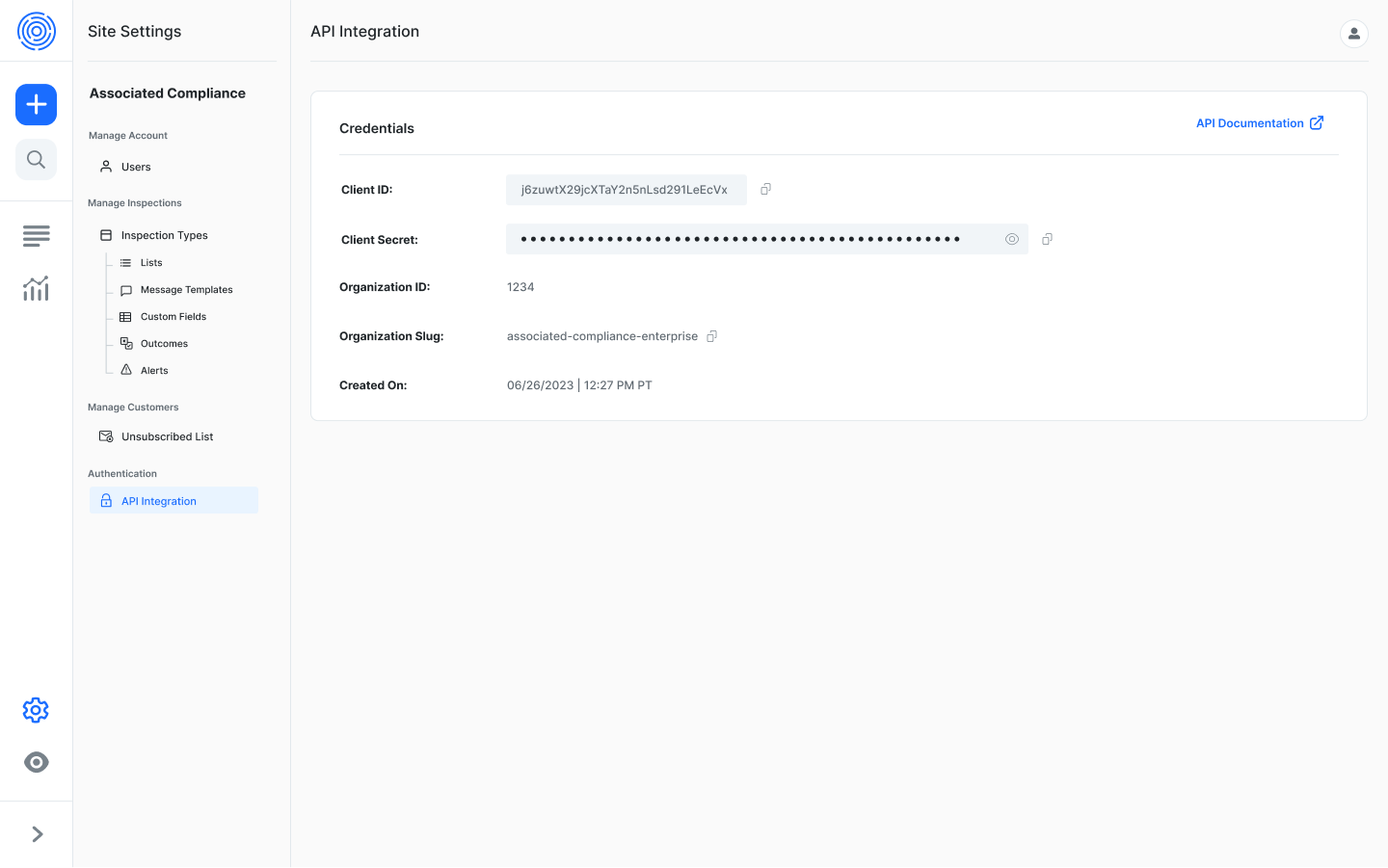
Vision Dashboard. Obtain API credentials in the settings.
The URLs on this page are for the US region. If you are using the EU region, the authorization and API base URLs are different. See the Regions page for EU-specific URLs and details.
Access Token
Authorization is done via OAuth 2.0 using the client credentials flow. With your client_id and client_secret, you request an access token from our authorization service. This access token must then be included in all Vision API requests using the following HTTP header:
Authorization: Bearer {access_token}
⚠️ Important: Store and Reuse Access Tokens
Each access token is valid for 72 hours and should be stored and reused for all API requests until it expires. The time of expiration is included in both the authorization service response (expires_in) and decoded JWT access token (exp).
Avoid generating a new access token for every API request. When the access token has expired (or is close to expiring), simply make another request to our authorization service for a new one.
Generating an Access Token
- Generate an access token by making a POST request to our authorization service's token endpoint: https://vision-auth.truepic.com/oauth/token
- Include the following
application/jsonpayload:
{
  "audience": "https://vision-api.truepic.com",
  "grant_type": "client_credentials",
  "client_id": "{CLIENT_ID}",
  "client_secret": "{CLIENT_SECRET}"
}
A CURL request for a token would look like:
curl --request POST \
  --url https://vision-auth.truepic.com/oauth/token \
  --header 'Content-Type: application/json' \
  --data '{
  "audience": "https://vision-api.truepic.com",
  "grant_type": "client_credentials",
  "client_id": "{CLIENT_ID}",
  "client_secret": "{CLIENT_SECRET}"
}'
Our authorization service will return an access token in a JSON payload that looks like this:
{
	"access_token": "{{ YOUR ACCESS TOKEN HERE }}",
	"expires_in": 259200,
	"token_type": "Bearer"
}
You can then take that access_token and use it in the Authorization header as your Bearer token.
Updated 4 months ago