

Find Inspections
Search, filter, sort, and paginate inspections with query string parameters on GET /v3/inspections.
Use GET /v3/inspections to search, filter, sort, and paginate inspections in your organization.
Every search is done through the query string. Use filter[q][=] for free-text search, filter[field][operator] for exact filters, sort[field]=asc|desc for ordering, and page[number] / page[size] for pagination. All of these are optional, and you can combine them to find the exact inspections you need.
Example
-
Start with the inspections endpoint.
GET https://vision-api.truepic.com/v3/inspections -
Add
filter[q][=]when you want to search across several fields with one query.https://vision-api.truepic.com/v3/inspections?filter[q][=]=jane%20doe -
Add exact filters with
filter[field][operator]when you know the field you want to match.https://vision-api.truepic.com/v3/inspections?filter[created_at][>=]=2023-06-01 -
Add sorting and pagination to control the result order and page size.
https://vision-api.truepic.com/v3/inspections?sort[created_at]=desc&page[number]=1&page[size]=25
You can combine free-text search, exact filters, sorting, and pagination in the same request.
Search
filter[q][=] is a free-text search parameter (a query that checks several inspection fields at once).
It can match:
customer_namecustomer_first_namecustomer_last_namecustomer_email_addressaddresscustom_field_values- the beginning of the inspection ID
- the customer phone number when your search term is numeric
Use these rules when building search queries:
- Search is case-insensitive for text fields.
- If you pass multiple terms, each term must match somewhere on the inspection.
- Terms shorter than 2 characters are ignored.
- For numeric terms, the query also attempts to match the customer phone number using the digits from your search value.
filter[q][=]accepts strings up to 100 characters.
Examples:
# Search by customer name
https://vision-api.truepic.com/v3/inspections?filter[q][=]=Jane%20Doe

# Search by email address
https://vision-api.truepic.com/v3/inspections?filter[q][=][email protected]

# Search by phone number
https://vision-api.truepic.com/v3/inspections?filter[q][=]=5551234567

# Search by inspection ID prefix
https://vision-api.truepic.com/v3/inspections?filter[q][=]=10234
Filter
Use exact filters when you want to narrow results to known IDs, dates, counts, photo upload status, or custom field values.
ID, status, and custom field filters
| Parameter | Operators | Type | Notes |
|---|---|---|---|
filter[id][in][] | in | array of positive integers | Match inspection IDs. |
filter[organization_team][in][] | in | array of team IDs | Only team IDs from your organization are allowed. |
filter[status][=] | = | integer | Match one inspection status ID. |
filter[status][in][] | in | array of integers | Match multiple inspection status IDs. |
filter[created_by_member][in][] | in | array of positive integers | Match the member who created the inspection. |
filter[assigned_to_member][in][] | in | array of positive integers | Match the assigned member. |
filter[inspection_type][in][] | in | array of positive integers | Match inspection type IDs. |
filter[outcome][=] | = | positive integer | Match one outcome ID. |
filter[outcome][in][] | in | array of positive integers | Match multiple outcome IDs. |
filter[custom_field_1][=] through filter[custom_field_20][=] | = | string, max 255 chars | Exact match against that custom field. The comparison trims whitespace and ignores case. |
filter[verification][in][] | in | array of strings | Match verification result values: pass, warn, fail. |
filter[photos][is] / filter[photos][is not] | is, is not | special filter | Filter based on whether a photo upload timestamp is present. This maps to photo_uploaded_last in results. Usually the value provided here is null to find inspections with or without photos. |
filter[alert_count][=], filter[alert_count][>], filter[alert_count][>=], filter[alert_count][<], filter[alert_count][<=] | =, >, >=, <, <= | integer, minimum 0 | Match inspections by alert count. |
For any in filter, repeat the query string key for each value:
https://vision-api.truepic.com/v3/inspections?filter[status][in][]=2&filter[status][in][]=3Date filters
| Parameter | Operators | Type | Example |
|---|---|---|---|
filter[closed_at][<], filter[closed_at][<=], filter[closed_at][>=], filter[closed_at][>] | <, <=, >=, > | ISO 8601 date string | filter[closed_at][>=]=2024-01-01 |
filter[expires_at][<], filter[expires_at][<=], filter[expires_at][>=], filter[expires_at][>] | <, <=, >=, > | ISO 8601 date string | filter[expires_at][<]=2024-12-31 |
filter[created_at][<], filter[created_at][<=], filter[created_at][>=], filter[created_at][>] | <, <=, >=, > | ISO 8601 date string | filter[created_at][>=]=2023-06-01 |
filter[updated_at][<], filter[updated_at][<=], filter[updated_at][>=], filter[updated_at][>] | <, <=, >=, > | ISO 8601 date string | filter[updated_at][>=]=2024-01-01 |
filter[scheduled_for][<], filter[scheduled_for][<=], filter[scheduled_for][>=], filter[scheduled_for][>] | <, <=, >=, > | ISO 8601 date string | filter[scheduled_for][<]=2024-12-31 |
updated_at is the timestamp for the inspection document in the database. It changes when the inspection record changes, but it does not necessarily change when an inspection is completed or when a new photo is uploaded. To find inspections with the most recent photo activity, sort by photos and filter out inspections without photos.
You can build ranges by combining the same field with multiple operators in one request:
https://vision-api.truepic.com/v3/inspections?filter[created_at][>=]=2024-01-01&filter[created_at][<]=2024-02-01Sort
Use sort[field]=asc or sort[field]=desc to control the order of the results.
| Field | Sort parameter |
|---|---|
| Status | sort[status] |
| Inspection type | sort[inspection_type] |
| Creator member | sort[member] or sort[created_by_member] |
| Assigned member | sort[assigned_to_member] |
| Photos | sort[photos] |
| Verification | sort[verification] |
| Created at | sort[created_at] |
| Scheduled for | sort[scheduled_for] |
| Alert count | sort[alert_count] |
If you do not pass a sort field, the endpoint defaults to created_at.
Paginate
| Parameter | Type | Constraints | Example |
|---|---|---|---|
page[number] | integer | page number | page[number]=1 |
page[size] | integer | maximum 100 | page[size]=25 |
Common recipes
Find inspections created after a date
https://vision-api.truepic.com/v3/inspections?filter[created_at][>=]=2023-06-01Find inspections created within a date range
https://vision-api.truepic.com/v3/inspections?filter[created_at][>=]=2024-01-01&filter[created_at][<]=2024-02-01Find inspections most recently updated with new photos
Use sort[photos]=desc with filter[photos][is not]=null to return inspections that have photos, ordered by the most recent photo upload. The photos sort maps to the photo_uploaded_last property returned with each inspection.
https://vision-api.truepic.com/v3/inspections?sort[photos]=desc&filter[photos][is%20not]=nullFind inspections with one or more alerts
https://vision-api.truepic.com/v3/inspections?filter[alert_count][>]=0&sort[alert_count]=descSearch across customer and address fields
https://vision-api.truepic.com/v3/inspections?filter[q][=]=jane%20doeSearch by phone number
https://vision-api.truepic.com/v3/inspections?filter[q][=]=5551234567Combine free-text search with team and status filters
https://vision-api.truepic.com/v3/inspections?filter[q][=]=smith&filter[team_id][in][]=12&filter[status][in][]=2&filter[status][in][]=3Filter by an exact custom field value
https://vision-api.truepic.com/v3/inspections?filter[custom_field_3][=]=ABC-123Find inspections assigned to a member and scheduled before a date
https://vision-api.truepic.com/v3/inspections?filter[assigned_to_member][in][]=42&filter[scheduled_for][<]=2024-12-31Sort newest first and return 25 results from page 2
https://vision-api.truepic.com/v3/inspections?sort[created_at]=desc&page[number]=2&page[size]=25Compare queries with the Vision Dashboard
We recommend comparing search results with the Vision Dashboard and watching how the URL changes as you apply filters. That is a quick way to understand which query string parameters to send from your integration. The dashboard uses the same filtering query string, so you can filter and search for the inspections you need, copy the query string, and use it with the Vision API to return the same inspections.
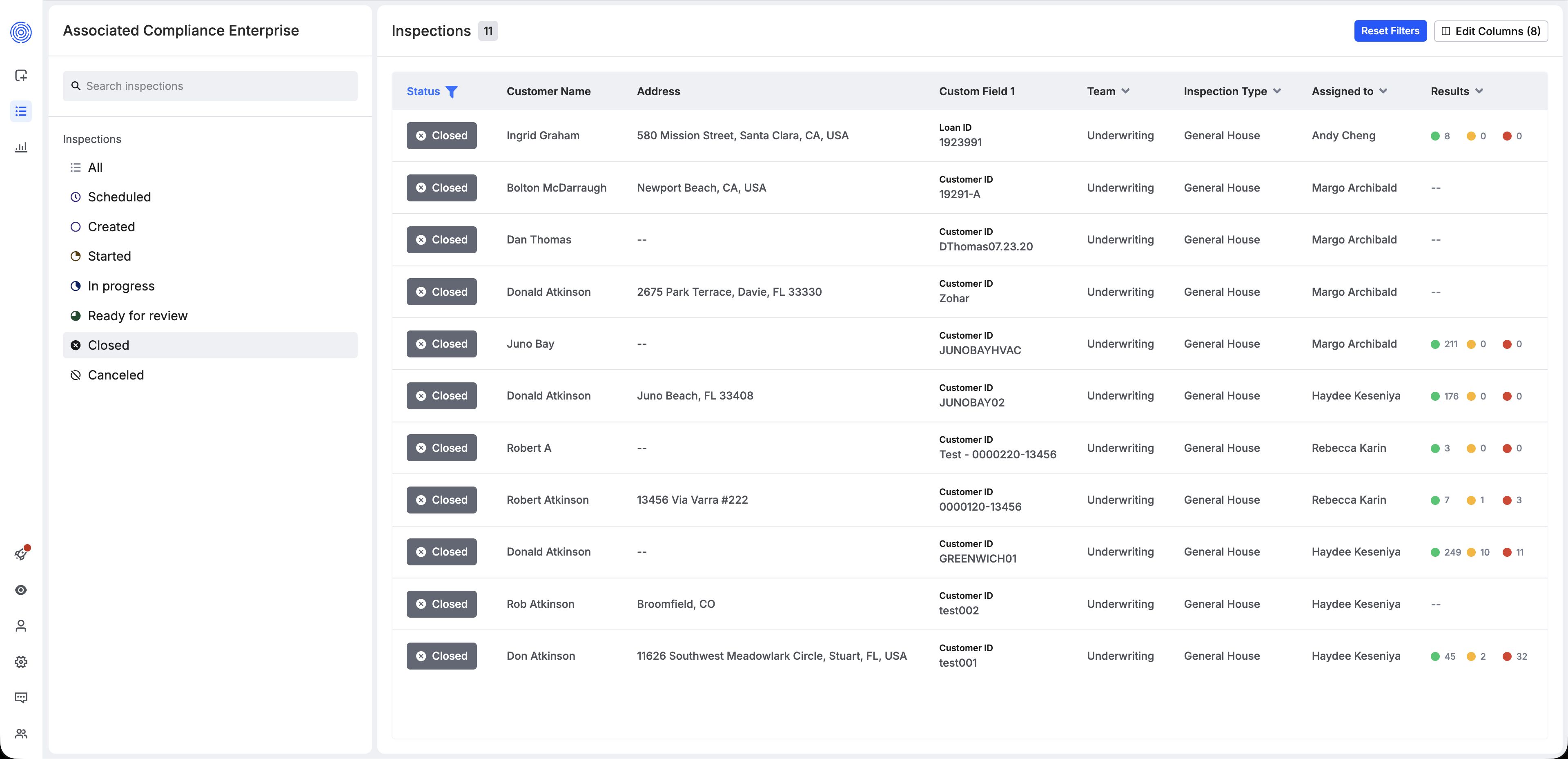
Vision Dashboard. Example of searching for inspections.
For the full endpoint details and to test queries interactively, see Inspections > Get a list of existing inspection requests.
Updated 4 months ago