

Conditional List Items
Show follow-up list items only when a customer selects a specific answer to a multiple-choice question.
Use conditional list items to show follow-up photos, videos, or questions only when a customer selects a specific multiple-choice answer.
For the complete list model — including item types, shared fields, grouping, and how to update lists on existing inspections — see Lists.
Add conditional items in the Vision Dashboard
Vision provides a conditional item feature which allows you to only show a customer a list item if a specific answer to a multiple-choice question is chosen by the customer.
From the Vision Dashboard, an organization administrator can manage conditional items on their organization's lists:
-
When creating or editing a list, add a multiple choice question.

-
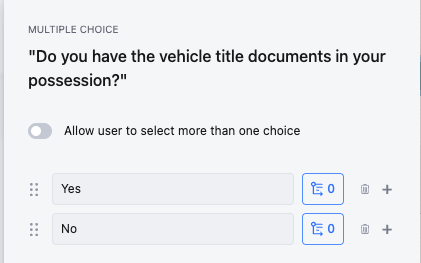
Click the "Edit Choices" icon.

-
Add the choices you'd like to to present to the customer.
-
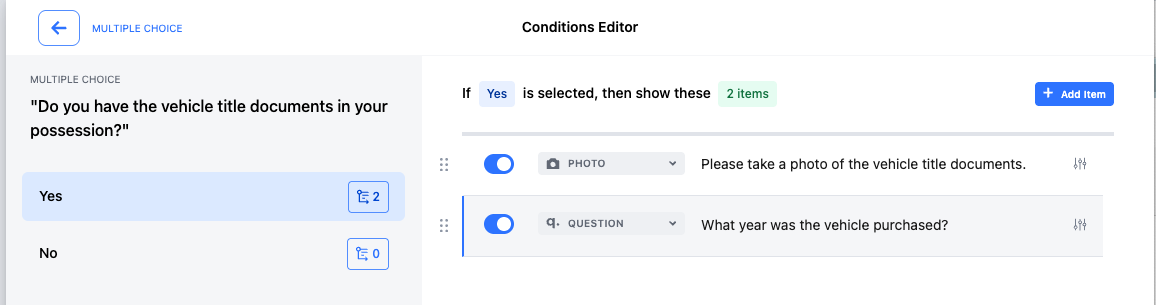
For the choice that you'd like to add a conditional item to, click the "Add Conditional Items" icon.

-
From the Conditions Editor, add as many conditional items as you'd like. These will only appear for the customer if the associated answer is selected.
-
Ensure you save your changes to the list when you are finished.
Nested Conditional Items (API only)
The Vision Dashboard does not allow for nesting conditional items within conditional items. However, the Vision API allows for nested conditional items. Use Lists for the base list structure, then apply the conditional pattern below when you need follow-up prompts.
- Multiple-choice question "Is the car in a drivable condition?" always appears for the customer.
- Multiple-choice question "Does the car have a broken windshield?" appears only if the customer answers "No" to the above question.
- Photo "Please take a photo of the broken windshield." appears only if the customer answers "Yes" to the above question.
- Multiple-choice question "Does the car have a broken windshield?" appears only if the customer answers "No" to the above question.
The matching data structure for the above looks like:
[
  {
    "type": "QUESTION",
    "name": "Is the car in a drivable condition?",
    "condition_id": "abc-1234567890", // A unique identifier used in the `conditions` property of other list items. It's best to generate a unique value for this field.
    "conditions": null, // Null because this is a "root level" item (always appears for customer)
    "question": {
      "type": "MULTIPLE_CHOICE",
      "options": {
        "choices": [
          {
            "name": "Yes",
          },
          {
            "name": "No",
          }
        ],
      }
    },
  },
  {
    "type": "QUESTION",
    "name": "Does the car have a broken windshield?",
    "condition_id": "def-1234567890",
    "conditions": [ // Note how this is an array, thus allowing for this conditional item to be triggered if ANY of the conditions are met.
      {
        "id": "abc-1234567890", // Note how this id references the "condition_id" of the above item.
        "question": {
          "answer": "No" // This list item will be shown if the answer "No" is given on the question with a condition_id of "abc-1234567890"
        }
      }
    ],
    "question": {
      "type": "MULTIPLE_CHOICE",
      "options": {
        "choices": [
          {
            "name": "Yes",
          },
          {
            "name": "No",
          }
        ],
      }
    },
  },
  {
    "type": "PHOTO",
    "name": "Please take a photo of the broken windshield.",
    "condition_id": null, // Null because this item has no "child" conditional items.
    "conditions": [
      {
        "id": "def-1234567890",
        "question": {
          "answer": "Yes" // This list item will be shown if the answer "Yes" is given on the question with a condition_id of "def-1234567890"
        }
      }
    ]
  }
]
Some notes regarding this data structure:
- A maximum depth of five layers of conditional items can be created (the "root" question plus four nested conditional items). The above example would be considered three layers.
- The possible answers do not have to be "Yes" or "No". They can be any string.
- The above data structure is simplified to demonstrate the relationship between conditional list items. For the broader list item model and examples of combining media, questions, groups, and request-more updates, see Lists.
- The above data structure can be used with the following endpoints:
- Create a list in the
itemsproperty of the request body - Update a list in the
itemsproperty of the request body - Create an inspection in the
list.itemsproperty of the request body
- Create a list in the
Updated 6 months ago